Azure Databricks is a core platform for modern analytics, AI, and machine learning solutions. It enables teams to process large datasets, collaborate on data pipelines, and deliver insights more efficiently than traditional platforms.
Deploying a Databricks workspace is straightforward, but creating a secure, production-ready environment can be complex. This is particularly important in finance, healthcare, and government, where security, compliance, and network control are essential. Data must not flow through public endpoints, and infrastructure should integrate with existing enterprise networks.
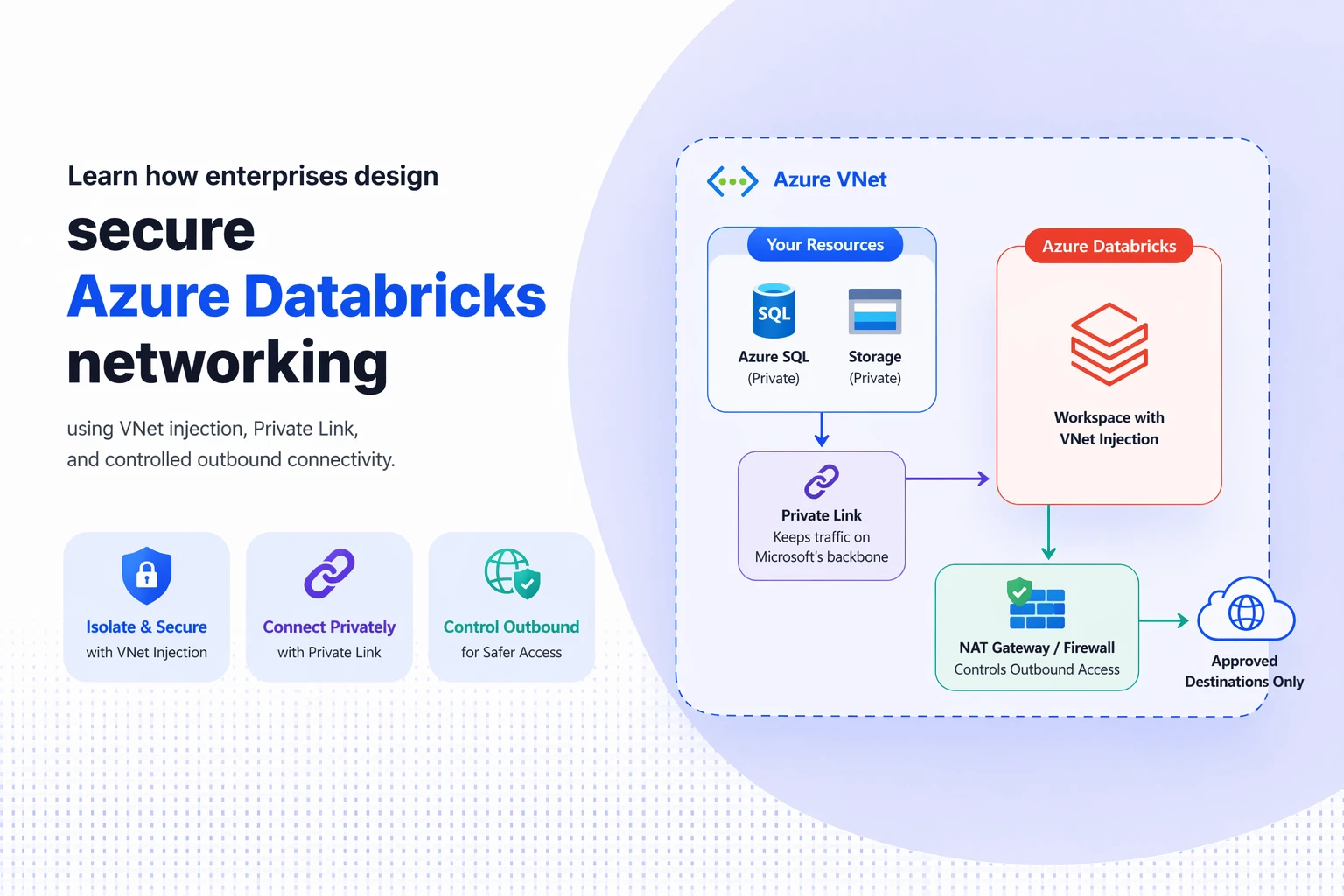
Networking concepts such as VNet injection, Private Link, and controlled connectivity are essential. Understanding how these components interact enables organisations to design robust and secure Azure Databricks environments. Strong Azure Databricks network security is foundational for enterprises that require controlled connectivity, private data access, and compliance-ready analytics platforms.
This overview explains the key networking concepts behind Azure Databricks and how they support enterprise-grade deployments.
Read More: Azure Synapse vs Databricks: Quick Guide for Decision Makers
Why is Strong Networking Critical in Azure Databricks Deployments?
In the default Azure Databricks deployment model, the platform automatically creates and manages the required infrastructure, including a virtual network.
This approach is effective for experimentation or development environments, as it removes much of the complexity of infrastructure configuration.
However, this model limits control over network traffic, as the service manages the network. For production analytics workloads, this lack of control can be problematic. Enterprise environments often require:
- Complete control over network traffic
- Integration with corporate networks
- Inspection of outbound connections
- Strict compliance and governance policies
To meet these requirements, many organisations implement custom networking models for greater visibility and control. VNet injection and Azure Private Link are two key capabilities that support this approach.

Eliminate rework, reduce risk, and scale with confidence
Don’t implement Azure blindly design it right from day one with Kloudify
Understanding VNet Injection in Azure Databricks
By default, Databricks clusters run on a network managed by the Databricks service. With VNet injection, organisations can deploy Databricks compute resources directly within their own Azure virtual network. This change gives IT teams significantly greater control over the environment.
When Databricks is deployed within an organisation’s virtual network, existing security policies and routing rules can be enforced. Network traffic can be inspected, restricted, or routed through corporate security tools such as firewalls and monitoring systems. Typically, a VNet-injected architecture includes two subnets:
| Subnet | Purpose |
| Private subnet | Used for secure internal cluster communication |
| Public subnet | Used for controlled external access where necessary |
Segmenting traffic into separate subnets allows organisations to implement stricter security policies while maintaining isolated internal communication. For long-term production environments, VNet injection provides the flexibility and governance required.
Private Link: Securing Access to Azure Services
While VNet injection controls the location of Databricks clusters, organisations must also secure how Databricks connects to Azure services; Private Link becomes critical.
Private Link allows services such as Azure Storage, SQL Database, and other platform services to be accessed through a private endpoint within a virtual network. Instead of using public internet endpoints, traffic remains within Microsoft’s private network. For organisations handling sensitive data, this approach offers significant security benefits. Private Link helps ensure that:
- Data traffic never leaves the private network.
- External access to services can be restricted.
- Security policies can be enforced consistently.
For example, if Databricks needs to access data from an Azure Storage account, Private Link enables this connection within the organisation’s virtual network. This removes exposure to public internet endpoints and reduces the attack surface.
Private Link Vs Service Endpoints:
Azure also provides service endpoints, which can sometimes serve as an alternative to Private Link. Service endpoints extend the identity of a virtual network to Azure services, enabling services to restrict traffic from specific virtual networks. This is an important distinction.
With service endpoints, the Azure service continues to expose a public endpoint. Access is restricted, but the endpoint remains accessible from the internet, removing public exposure by assigning a private IP address inside the virtual network. The two approaches serve different needs.
| Feature | Private Link | Service Endpoints |
| Network exposure | Fully private | Public endpoint remains |
| Security level | High isolation | Moderate isolation |
| Configuration complexity | Higher | Simpler |
| Ideal for | Highly regulated environments | General Azure service connectivity |
For organisations handling sensitive or regulated data, Private Link is often the preferred app. For organisations managing sensitive or regulated data, Private Link is often preferred because it ensures communication remains within a private network controlling outbound traffic.
Serverless compute and distributed analytics platforms often require access to external services, but unrestricted internet access can violate security policies.
In many enterprise environments, security teams enforce a deny-by-default policy, blocking outbound traffic unless explicitly permitted.
To support this model, organisations often use several Azure networking tools:
- Azure Firewall for traffic inspection
- Route tables for directing traffic flows
- Network security groups for access rules
- Private endpoints for approved services
In this architecture, Databricks traffic is routed through a security layer, typically a firewall, before reaching external services. This enables organisations to monitor and restrict outbound connections based on approved domains or services.
Such designs are particularly important for industries that must meet strict compliance requirements.
How Do you upgrade to a VNet Injection?
Historically, organisations that moved from a default managed workspace to a VNet-injected architecture had to create a new workspace and migrate workloads. This process was often complex and disruptive, particularly for teams running production data pipelines. It enables existing managed workspaces to be upgraded directly to VNet-injected environments. This simplifies the move to a more secure architecture. Before upgrading, teams usually need to prepare several components, including:
- Virtual networks and subnets
- Network security groups
- Appropriate permissions and dependencies
Once these elements are in place, the workspace can be redeployed with the updated networking configuration. This enables organisations to strengthen their security posture without rebuilding the entire environment.
Designing a Secure Databricks Architecture
A well-designed Azure Databricks network architecture typically integrates multiple networking components. An enterprise architecture may include segmented subnets.
- Private endpoints for Azure services
- Firewalls or inspection points for traffic monitoring
- Logging and diagnostic tools for observability
When these components are implemented correctly, organisations gain strong control over data movement within their analytics platform. This ensures analytics workloads can scale efficiently while maintaining required security and governance standards.
Choose Kloudify for Azure Deployment:
Designing secure Azure Databricks networking architectures can be complex. Balancing security, performance, and operational simplicity requires deep expertise in Azure infrastructure and data platforms.
Kloudify helps organisations implement secure, scalable Azure data environments to support advanced analytics and AI workloads. By implementing VNet injection and Private Link connectivity and automating infrastructure with Infrastructure-as-Code, Kloudify ensures data platforms are built for long-term success.
Whether you are deploying Azure Databricks for the first time or upgrading an existing environment, Kloudify can help you build a secure, compliant architecture ready for production-scale analytics.
Build a Secure, production ready Azure Databricks Environment